
Zvec
English | 中文







🚀 Quickstart | 🏠 Home | 📚 Docs | 📊 Benchmarks | 🔎 DeepWiki | 🎮 Discord | 🐦 X (Twitter)
Zvec is an open-source, in-process vector database — lightweight, lightning-fast, and designed to embed directly into applications. Battle-tested within Alibaba Group, it delivers production-grade, low-latency and scalable similarity search with minimal setup.
[!Important] 🚀 v0.7.0 (August 24, 2026)
- zvec-grep (
zg): Local-first workspace search that unifies ripgrep, BM25, and vector search behind one CLI — built for humans and AI agents.- ReMe integration: zvec is now a file store backend in ReMe, the memory management kit for agents, providing in-process HNSW ANN search.
- DiskANN productionization: Adds Linux ARM64 / macOS ARM64 support and an io_uring async I/O backend, with automatic fallback to the best available I/O option — no user intervention needed.
- Index optimization: New IVF-RaBitQ index and PQ-INT8 quantizer; RaBitQ supports runtime AVX2 / AVX512 dispatch, so the same binary automatically picks the best path on each CPU.
- Deployment experience improved: Prebuilt dynamic libraries slimmed significantly (macOS arm64 C API library 37→22 MB, -40%); new musl libc / Alpine Linux support; prebuilt SDK binaries for Linux (glibc/musl), macOS, Windows, Android, and iOS published with every release.
- DocIterator: New iterator for streaming full-collection document traversal across C++, C, and Python.
- Full-text search: New N-gram tokenizer, better suited for phrase, code, and short-text search.
#💫 Features
- Blazing Fast: Searches billions of vectors in milliseconds.
- Simple, Just Works: Install and start searching in seconds. Pure local, no servers, no config, no fuss.
- Dense + Sparse Vectors: Support dense and sparse embeddings, multi-vector queries, and a rich selection of vector index types that scale from memory to disk.
- Full-Text Search (FTS): Native keyword-based full-text search — query string fields with natural-language or structured expressions.
- Hybrid Search: Fuse vector similarity, full-text search, and structured filters in a single query for precise results.
- Durable Storage: Write-ahead logging (WAL) guarantees persistence — data is never lost, even on process crash or power failure.
- Concurrent Access: Multiple processes can read the same collection simultaneously; writes are single-process exclusive.
- Runs Anywhere: As an in-process library, Zvec runs wherever your code runs — notebooks, servers, CLI tools, or even edge devices.
#📦 Installation
Zvec offers official SDKs across multiple languages:
- Python:
pip install zvec(requires 64-bit Python 3.10–3.14) - Node.js:
npm install @zvec/zvec - Go: High-performance Go bindings.
- Rust:
cargo add zvec-rust - Dart/Flutter:
flutter pub add zvec
Searching code or documents? Try zvec-grep (zg) — a local-first search CLI that unifies ripgrep, BM25, and vector search, built for humans and AI agents.
Prefer a visual tool? Try Zvec Studio to browse data and debug queries — no code required.
#✅ Supported Platforms
- Linux (x86_64, ARM64; glibc & musl)
- macOS (ARM64, x86_64)
- Windows (x86_64)
#🛠️ Building from Source
If you prefer to build Zvec from source, please check the Building from Source guide.
#⚡ One-Minute Example
import zvec

# Define collection schema
schema = zvec.CollectionSchema(
    name="example",
    vectors=zvec.VectorSchema("embedding", zvec.DataType.VECTOR_FP32, 4),
)

# Create collection
collection = zvec.create_and_open(path="./zvec_example", schema=schema)

# Insert documents
collection.insert([
    zvec.Doc(id="doc_1", vectors={"embedding": [0.1, 0.2, 0.3, 0.4]}),
    zvec.Doc(id="doc_2", vectors={"embedding": [0.2, 0.3, 0.4, 0.1]}),
])

# Search by vector similarity
results = collection.query(
    zvec.Query(field_name="embedding", vector=[0.4, 0.3, 0.3, 0.1]),
    topk=10
)

# Results: list of {'id': str, 'score': float, ...}, sorted by relevance
print(results)
#📈 Performance at Scale
Zvec delivers exceptional speed and efficiency, making it ideal for demanding production workloads.
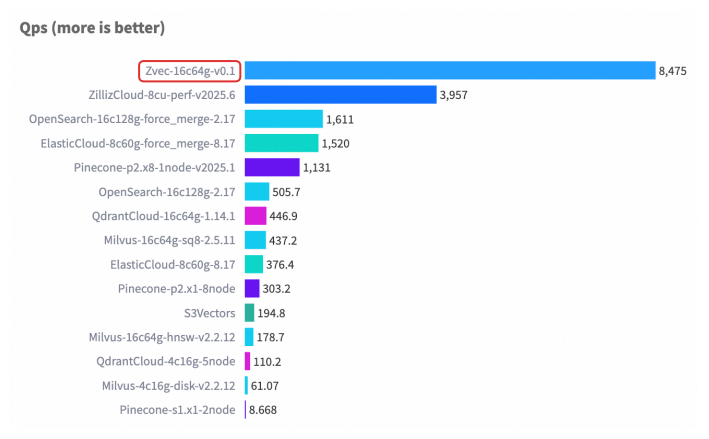
For detailed benchmark methodology, configurations, and complete results, please see our Benchmarks documentation.
#🤝 Join Our Community
| 💬 DingTalk | 🎮 Discord | X (Twitter) | |
|---|---|---|---|
 |
 |
 |
 |
| Scan to join | Scan to join | Click to join | Click to follow |
#❤️ Contributing
We welcome and appreciate contributions from the community! Whether you're fixing a bug, adding a feature, or improving documentation, your help makes Zvec better for everyone.
Check out our Contributing Guide to get started!